

ChatGPT has already changed how millions of people work, write, and think, but there’s a meaningful gap between using it and using it well.
For many users, it functions like an upgraded search engine: type a question, glance at the answer, and move on. Just not nearly as well as it could. The people extracting real value aren’t stumbling into better prompts — they understand a few simple principles that most users never stop to learn.
Once you cross that line, the difference is hard to ignore. Work that used to take an hour takes ten minutes. Writing that needed three drafts lands in one. Problems you’d normally sit with for days find a direction faster than you expected. It doesn’t feel like a trick. It starts to feel like a meaningful upgrade to how you approach problems.
The Golden Rule of Prompting
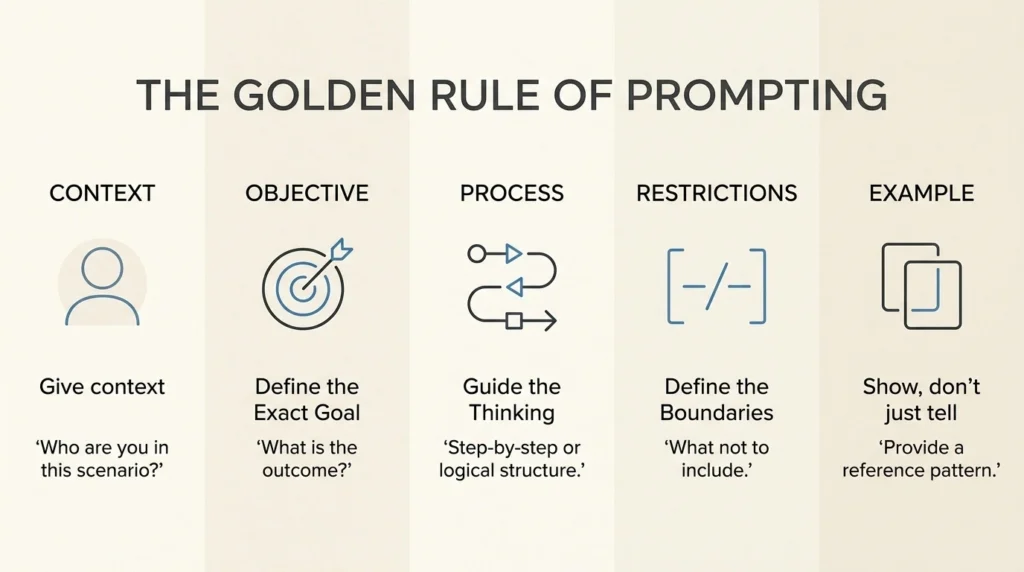
Context: Set the Scene
Before you ask, give context. Who are you in this scenario? Are you a student building your first website, a content creator drafting a blog, or a professional developer optimizing a high-traffic site?
The AI responds better when it knows whose perspective it should take.
For example: ‘’I am a student building my first blog site using WordPress. I have zero knowledge and am using the free version of the Spectra plugin.’’
Now the AI understands:
- You need simple explanations
- You’re limited to a specific tool
- You’re likely building from scratch
Objective: Define the Exact Goal
A vague request leads to a vague answer. If you don’t specify what you want, the AI might give you too much information, too little, or something completely off-target. The key is to be specific and outcome-focused.
For example: “I need a homepage layout that prioritizes a ‘Latest Posts’ grid and a sidebar for affiliate links.”
This works because it defines:
- The page type (homepage)
- The structure (posts grid + sidebar)
- The purpose (affiliate links)
Process: Guide the Thinking
This is where prompting starts to produce noticeably better results.
For complex tasks, don’t just ask for the answer—ask for the process.
When you ask for step-by-step explanations, the output becomes more structured and easier to follow. This leads to clearer, more logical, and more useful outputs.
This is especially helpful when:
- You’re learning something new
- You’re planning a project
- You’re solving a problem
Instead of jumping straight to results, you guide the AI to walk through the reasoning.
For example: “First, explain the ideal SEO structure of a standard blog. Then give me a step-by-step plan for designing it in the correct order.”
It turns the response into a mini roadmap instead of just information.
Restrictions: Define the Boundaries
Constraints are just as important as the instructions themselves. They keep the output focused and prevent the AI from wandering into irrelevant territory. Without constraints, the AI might suggest tools, methods, or techniques that don’t fit your situation.
Examples of restrictions:
For example: “Use only the free version of Spectra. No custom coding or extra page builders.”
Example: Show, don’t just tell.
Sometimes, describing what you want isn’t enough. The fastest way to get a precise result is to show an example.
This technique is often called few-shot prompting—where you provide one or more examples for the AI to follow. You provide a reference, and the AI follows that pattern.
Instead of explaining something abstract like “make it look modern,” you give something concrete to mimic.
For example: “Give me instructions so the website theme looks like [Site Name/Style], focusing on their minimalist headers and white space.”
The Final Pro Prompt (Combining all steps)
I’m a beginner using WordPress and the Spectra free plugin (Context). I want to design a high-performance blog layout (Objective). First, explain the ideal site structure for SEO and tell me which page to design first (Process). Use only Spectra blocks and avoid any custom CSS (Restrictions). Give me instructions so the website theme looks like [Site Name/Style] (Example).
| Pillar | Purpose | WordPress Example |
| Context | Sets the perspective | “I’m a beginner using Spectra and WordPress.” |
| Objective | Defines the Goal | “I need a layout for a blog with an affiliate sidebar.” |
| Process | Ensures logical flow | “First explain the SEO structure, then give steps for designing it.” |
| Restrictions | Sets the boundaries | “Use only free Spectra blocks; no custom CSS.” |
| Example | Sets the style | “Make it look minimalist like [Site Name].” |
Best Ways to Use ChatGPT in Everyday Life
Turn Messy Thinking Into Clear Direction
Most ideas don’t begin in a clean, structured way. They usually start as scattered thoughts—half-formed concepts, random notes, and unclear goals.
You might have a general sense of what you want, but struggle to connect the pieces into something meaningful. This is where ChatGPT becomes incredibly useful—not as someone who replaces your thinking, but as a tool that helps organize it.
Instead of staring at a blank page or trying to mentally sort everything out, you can simply offload your thoughts and let ChatGPT structure them for you.
Try this: Copy and paste your random notes, half-finished thoughts, or a rough list of goals.
Prompt example: ‘’I’m dumping all my rough thoughts for a new project below. They are currently a mess. Help me categorize these into a logical hierarchy, identify the core themes, and point out any missing steps I haven’t considered yet.’’
Externalize Your Thinking
A lot of people get stuck because everything stays in their head.
When thoughts stay internal, they feel bigger, more complex, and harder to resolve. The moment you put them outside, things change.
ChatGPT gives you a place to think out loud without friction.
For example: “I’m unsure whether I should focus on blog design or content first. Help me think through this decision.”
This way can make your options clearer and decisions easier.
Turn Problems Into Checklists Instantly
Often, it’s not just difficulty—it’s that the problem isn’t clearly defined. More often, it’s because it’s undefined.
A vague problem creates mental resistance. You don’t know where to start, what steps to take, or how long it will take—so you avoid it.
ChatGPT can be very effective at turning vague problems into structured steps.
Prompt example: “I need to [Your Goal]. This feels overwhelming. Break this down into a 10-step checklist where each task takes less than 30 minutes to complete. Start with the absolute first click I need to make.”
Once something becomes a checklist, it becomes manageable.
Reverse Engineer Successful Examples
Instead of guessing why a successful blog or a beautiful layout works, you can use AI to strip it down to its skeleton. This is how you learn the “why” behind the “what.”
Describe a specific style or strategy you admire and ask the AI to find the patterns.
Prompt Example: “Analyze the structure of a high-converting landing page. Break it down into the psychological triggers being used, the visual hierarchy, and the underlying content strategy. Why does this work?”
Simulate Outcomes Before Acting
One of the most powerful ways to use ChatGPT is as a thinking simulator.
Before committing to a decision, you can explore its possible outcomes—like running a rough mental simulation to explore possible outcomes (not guaranteed predictions).
Prompt Example: “I am planning to implement [X Strategy]. Act as a cynical project manager. Tell me five reasons why this plan might fail in six months, and what I should do now to prevent those failures.”
This allows you to see beyond the immediate benefits and consider long-term trade-offs. You can identify risks early, spot missed opportunities, and make more informed decisions.
Conclusion
ChatGPT isn’t just a tool you use—it’s a tool you learn to think with. The real difference doesn’t come from asking more questions, but from asking better ones.
Once you understand the core principles—giving context, defining a clear objective, guiding the process, setting boundaries, and showing examples—you stop getting random answers and start getting results you can actually use. What once felt confusing becomes structured. What felt overwhelming becomes actionable.
More importantly, ChatGPT becomes something bigger than a writing assistant. It becomes a thinking partner—helping you organize ideas, test decisions, and move fasterBecause in the end, the people who benefit most from ChatGPT aren’t the ones who use it the most—they’re the ones who use it well.